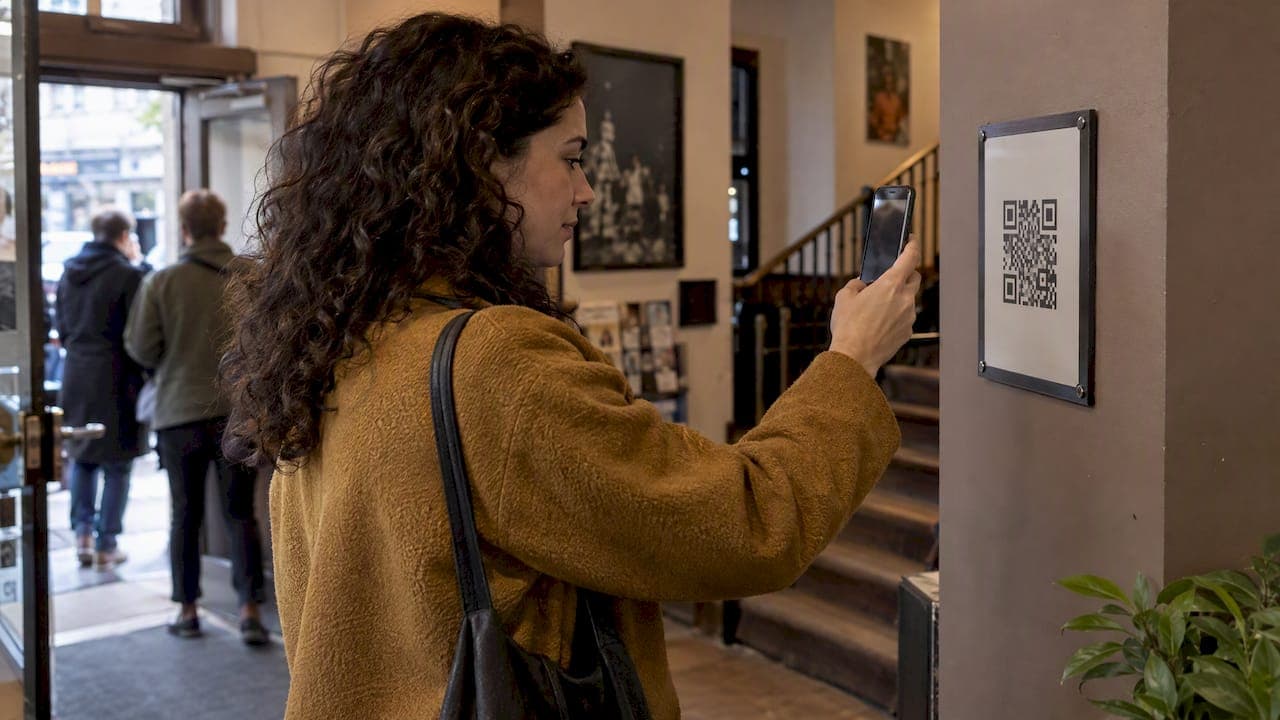
A web check-in queue lets customers join your line from a browser: they scan a QR code or tap a kiosk, enter a name or phone number, and wait wherever they like until you call them. No app download, no clipboard, no shouting names across a room. If you run a restaurant, clinic, barbershop, food truck or event, it is the cheapest way to take the physical line out of your lobby.
One note on the search itself: most results for this phrase are about airline web check-in, which is a different thing. If you are flying, your airline's own site is the right place. This guide is for the people running the counter.
TL;DR
- A web check-in queue is a browser-based line: customers join by QR code or kiosk, get a ticket number, and are notified when it is their turn.
- Skipping the app is the point. Every download you ask for is a customer who may walk away.
- QR check-in is the lowest-cost entry. A reception kiosk or tablet suits places where some customers do not carry a phone, or where staff want to hand over the device.
- Judge software on four things: no customer install, how notifications are charged, what hardware you need, and how fast your team can run it from a phone.
- Our plans start at $3.90 per month, with a free two-month trial before you pay.
Table of Contents
- What a web check-in queue actually is
- Why moving the line online pays off
- Kiosk vs QR check-in: which to choose
- Web check-in versus app-based queues
- What to look for in check-in queue software
- Our perspective: the queue is the first thing a customer experiences
- How to roll out a web check-in queue in a week
- Setups by business type
- What it costs with Ezseat
- Common mistakes to avoid
- A note on airline web check-in
- FAQ
- Sources
What a web check-in queue actually is
The idea is simple. A customer arrives, or even approaches from the street, and joins a digital list in their phone's browser. They get a position or ticket number. You see the list on a phone, tablet or screen. When you are ready, you call the next person, and they are notified.
The word "web" matters because it removes the install step. A customer who must find an app in an app store, wait for a download and create an account has already spent more effort than the thirty seconds they were willing to give you. A browser page opens from a QR code in a few seconds on practically any phone.
A complete setup usually has three parts:
- An entry point. A printed QR code at the door, a link in your bio, or a tablet at reception.
- An operator view. The screen where you or your staff see who is waiting and call the next person.
- A way to reach people. A public screen showing ticket numbers, plus SMS or call notifications for those who have stepped away.
If you want the longer background, we cover the concept in our guide to virtual queues with no app.
Why moving the line online pays off
Waiting is emotional, not just logistical. ScanQueue's State of Customer Waiting 2026 findings, published in a May 2026 press release, report that 75% of consumers tie waiting in line to negative emotions. That is a vendor-published figure, so treat it as indicative, but it matches what most operators see at the door: people who stand and stare at a line get irritable.
Three practical effects follow when the line moves off your floor.
Fewer people walk away
A long visible line is its own advertisement for going elsewhere. The same press release cites industry data that businesses can lose up to 30% of potential walk-in customers when they see a crowded physical queue. A person who can join from the sidewalk, then go get a coffee, never sees that line.
Waiting becomes usable time
Queue specialists describe the benefit as "time freedom": the wait turns into time customers can spend browsing nearby shops or sitting in their car. For a restaurant, that means a guest who is not crowding your entrance. For a clinic, it means a waiting room that stays calm.
Your staff stop managing the room
A 2025 paper on smart queue management systems describes digital check-in, wait-time updates and notifications as the core of such systems, and reports that frontline staff rated service quality higher once manual crowd control and calling out names went away. The paper is academic and its sample is its own, but the direction is easy to believe if you have ever been the person shouting "Table for Martinez?" over a dinner rush.
What the case studies claim
A VirtualQ case study from Genie InfoTech describes a QR-based virtual queue where customers join remotely, see their position and are notified as their turn approaches. The figures it reports include a 60% reduction in perceived wait time, a 90% reduction in walkaway rate and a 25% increase in customers served during peak hours. Those are the results of one build for one client, not a promise for every business. Use them as a reason to run your own test, not as a forecast.
Kiosk vs QR check-in: which to choose
This is the question operators ask most. The honest answer is that they solve different problems, and many places end up using both.
| QR code check-in | Reception kiosk or tablet | |
|---|---|---|
| Customer needs a phone | Yes | No |
| Up-front cost | A printed sign | A tablet and a stand |
| Works before customer arrives | Yes, from a link or a sign outside | No, only on site |
| Staff effort | Almost none | Someone may need to help first-time users |
| Best for | Restaurants, food trucks, events, barbershops | Clinics, front desks, older or less phone-reliant visitors |
| Risk | Customers who will not scan | Queue at the kiosk itself at peak |
When QR is enough
If most of your customers are carrying phones, which is true for a food truck line or a busy brunch spot, a QR code on the door, window or table is all you need. It costs close to nothing, and it lets people join before they even walk in. Our QR code waitlist setup guide walks through where to place the code and what to ask for at sign-in.
When you want a kiosk
A tablet at reception earns its place where visitors are not all comfortable with phones, or where you want a consistent intake step: a clinic asking for a reason for the visit, for example. It also gives a visible, obvious place to start, which helps first-time visitors. Custom fields on the check-in form let you collect only what you need.

Why not just do both
The smart setup is a tablet at the counter and a QR code on the door, both feeding one list. Someone who walks in and prefers the tablet uses it. Someone who sees a crowd through the window scans the code and waits outside. Both end up in one queue, and your staff look at one screen.

A word on QR safety: scanning is only as trustworthy as the code on your wall. Check periodically that no one has stuck another sticker over yours, and keep codes inside the premises or behind glass where you can.
Web check-in versus app-based queues
Many queue and waitlist tools expect the customer to install something. That works for loyalty programs customers choose to join. It works poorly for a one-time visitor who just wants a table or a haircut.
There is a broader movement toward app-free QR flows for small businesses; this look at app-free QR code check-in makes the case from the customer-data side, including privacy considerations for businesses in Europe. The principle carries over to queues: the less you ask of a customer, the more of them complete the step.
An app-free web queue also helps on your side. There is nothing for you to publish, update or support in app stores, and a customer on any phone, old or new, sees the same page.
What to look for in check-in queue software
Whether you are researching the best check-in kiosk software or the best tablet check-in apps, the same criteria apply. Ask each tool these questions before you commit.
1. Does the customer have to install anything?
If the answer is yes, expect a drop-off at the first step. A browser-only flow is the safest bet for walk-in trade.
2. How are notifications priced?
SMS and call alerts are where bills grow. Some tools charge per message, so a busy Saturday costs more than a slow Tuesday. Ask for the total monthly cost at your busiest realistic volume, not the headline plan price.
3. What hardware do you need to buy?
A dedicated kiosk can run into hundreds of dollars before you check anyone in. If software runs on a phone or any tablet you already own, you can start today. If you want to compare approaches at a deeper level, see our roundup of the best queue management software for SMBs.
4. Can your team run it from a phone?
A host walking the floor or a barber between cuts is not sitting at a desktop. The operator view should work from a phone, so calling the next customer takes one tap.
5. Can it grow with you?
Check whether you can add queues, devices and screens later without switching tools. A barbershop with one chair and a clinic with three service desks need different setups, and you may become the second one.
6. Does it handle your specific question set?
A restaurant wants party size. A clinic wants the reason for the visit. A food truck wants nothing but a name and a number. Custom fields on the sign-in form let one tool fit all three.
Our perspective: the queue is the first thing a customer experiences
We built Ezseat around one belief: the first interaction a customer has with your business is the wait, and most businesses leave it to chance. Operators tell us the same thing in different words. They do not want another app to push on customers, another box to buy, or a bill that grows each time they send a text.
So we kept the design narrow. Customers join from a browser. Operators manage the line from a phone or tablet. Public screens show ticket numbers for those watching the room, reception kiosks cover people without a phone, and SMS or call notifications reach those who have wandered off. There is no per-message cost and no hardware to buy.
Our advice to most new operators is to start smaller than you think. Put a QR code on the door, run one queue for one week, and watch where people hesitate. Then add a screen or a kiosk only if you see a real gap. A queue system should disappear into the background of service, and the best sign it is working is that nobody mentions it.
— Ezseat
How to roll out a web check-in queue in a week
You do not need a project plan. A realistic first week looks like this.
- Day 1: define the queue. Decide what a customer joins: a table list, a walk-in appointment line, a ticket for the truck window. Pick the two or three fields you really need.
- Day 2: set up and test. Create the queue, then join it yourself from your own phone and from a friend's older one. Time how long it takes.
- Day 3: print and place the QR code. Put it at eye level outside the door and at the counter. Add one line of plain instructions: "Scan to join the line. We will text you."
- Day 4: brief your team. One person owns the operator screen per shift. Everyone else sends customers to the code. Practice calling the next person and handling a no-show.
- Day 5: add a display if the room needs it. A public screen with ticket numbers reassures people who prefer to watch for their turn. A tablet at reception covers customers without phones.
- Days 6 and 7: watch and adjust. Note how many people ask for help, how many no-shows you get, and whether your wait estimates match reality.
On that last point, honest estimates matter more than optimistic ones. Customers forgive a longer wait that was predicted. They do not forgive one that was promised short. Our piece on why wait estimates lose customers goes deeper, and the guide to app-free wait time notifications shows how to word the alert so people come back on time.
Setups by business type
Restaurants
Post the QR code outside, ask for name and party size, and notify guests when their table is nearly ready. The goal is a quiet entrance and a host who spends time seating people, not answering "how much longer?"
Clinics and walk-in care
Pair a tablet at reception with a QR code so patients can join from the parking lot. Keep the form short and avoid collecting more health information than the front desk needs. Our guide to walk-in waitlist systems for clinics and service venues covers the front-desk flow in more depth. If your practice handles protected health information, check with your compliance lead what may go into a check-in form.
Food trucks and pop-ups
A ticket number and a phone notification beat a crowd around the window. Customers can wander the market and come back when called.
Barbershops
Walk-ins join from the door or from home, and the barber sees the order on a phone without stopping. Fewer people hover around the chairs.
Events
For registration desks, stage meet-and-greets or activity stations, a web queue lets organizers manage crowds without barriers and staff. Compare options in our look at web-based queues for events and businesses, and see how queue numbering works for walk-in businesses.
What it costs with Ezseat
We publish our prices, and they are the same for every business:
| Plan | Monthly | Annual |
|---|---|---|
| Light | $3.90 per month | $39.00 per year |
| Pro | $14.90 per month | $149.00 per year |
Every account starts with a free two-month trial before you are charged for Light or Pro. There is no per-message fee and no hardware requirement: you run it from the phone or tablet you already have. You can see both plans and start your trial on the Ezseat site.
Common mistakes to avoid
- Hiding the QR code. If customers have to ask where it is, you have lost the benefit. Put it where the line forms.
- Asking for too much. Each extra field slows sign-in. Start with a name and, if you need it, a phone number.
- No plan for people without phones. Keep a tablet or a staff member ready to add them to the list.
- Skipping the no-show rule. Decide in advance how long you hold a spot after calling someone, and say so on the sign-in page.
- Changing everything at once. Run a single queue first. Add screens, kiosks and extra queues once the basics feel natural.
A note on airline web check-in
Because the phrase is shared with air travel, here is the short version for travelers. Airlines typically open online check-in 24 to 48 hours before departure, and close it between 45 and 60 minutes before a domestic flight, with longer cut-offs for international ones. Ethiopian Airlines, for example, explains the process on its online check-in page, and the exact window depends on your airline and airport. Always read your own airline's rules, because missing the close-out can cost you your seat.
FAQ
What is a web check-in queue?
It is a line that customers join through a web browser instead of standing in a physical queue. They scan a QR code or use a kiosk, receive a ticket or position, and get notified when it is their turn. No app download is needed.
Is a kiosk or a QR code better for check-in?
QR check-in costs almost nothing and lets people join before they arrive, so it suits restaurants, food trucks and barbershops. A kiosk or tablet helps where some visitors do not carry a phone, such as clinics. Most businesses get the best result by offering both, feeding the same list.
Do customers need to download an app to join?
Not with a browser-based system. The customer opens a web page from a QR code or link, so it works on practically any phone with a camera and a browser. That keeps sign-in to a few seconds.
How much does queue software cost?
It varies widely, and per-message fees and hardware can add to the headline price. Ours is $3.90 per month for Light or $14.90 per month for Pro, with annual options at $39.00 and $149.00 per year, and a free two-month trial first.
Can I run it with just a phone?
Yes. The operator view works from a phone or tablet, so a host, barber or truck operator can call the next customer with one tap. A public screen or kiosk is optional and can be added later.
Sources
- ScanQueue Data: 75% of Consumers Tie Waiting in Line to Negative Emotions
- VirtualQ Case Study, Genie InfoTech
- The Role of Smart Queue Management Systems in Enhancing Customer Flow and Service Quality
- Online Check-In Eligibility, Ethiopian Airlines