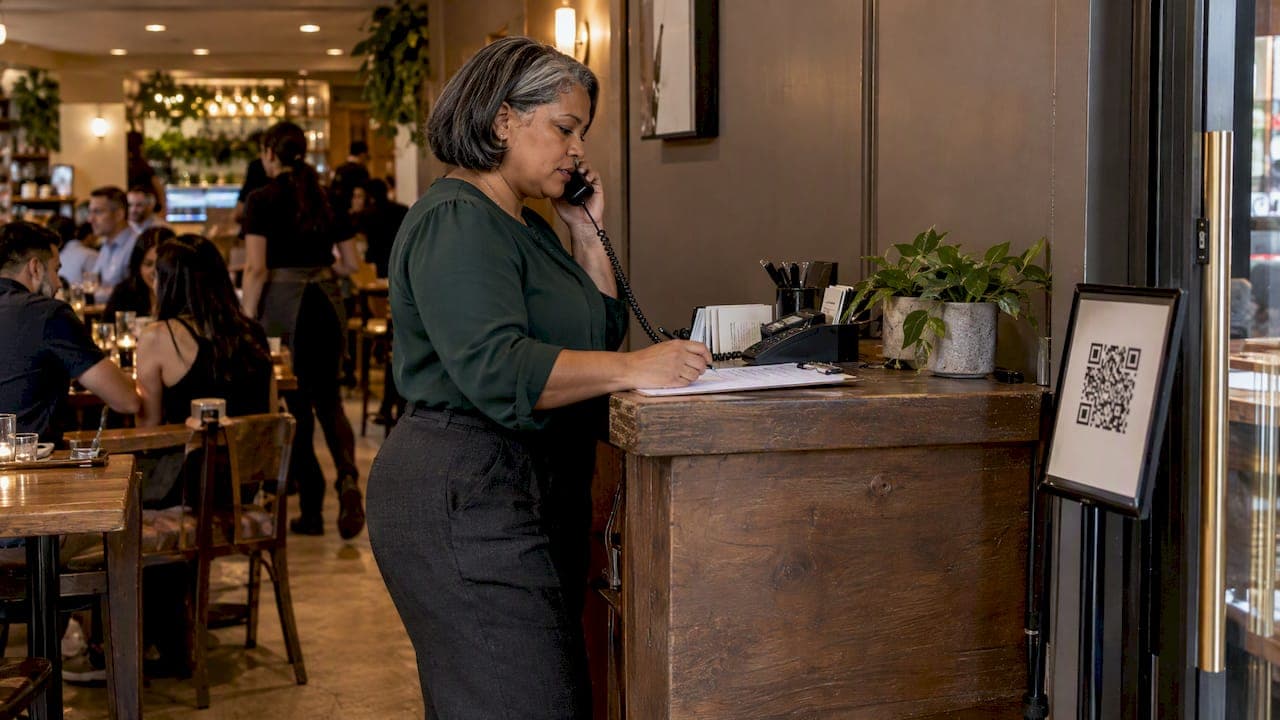
For most walk-in businesses, online check-in beats phone calls for managing a queue, because it takes the guest's place in line without tying up your staff. Phone calls still win in a few cases: guests with no smartphone, urgent or complicated requests, and customers who simply want a human voice. The best setup is usually online check-in as the default, with the phone kept as a backup. This guide compares the two on wait times, missed turns, staff workload, access and cost, so you can pick the right mix for a restaurant, clinic, barbershop, food truck or event.
TL;DR
- Online check-in scales better at peak hours: guests join the queue themselves, and your staff stop answering the same "how long is the wait?" call again and again.
- Phone calls remain the most accessible channel for older guests, people without a smartphone, and anyone who needs to explain something before joining.
- Research on clinics suggests online and phone systems can cut access time and raise satisfaction, but digital channels create their own barriers for some users.
- A hybrid works best: browser-based check-in for most guests, a phone line (or staff-entered tickets) for the rest, and a few simple measures to see if it's working.
- Judge any change against your own baseline: average wait, walkaways, no-shows and staff time per guest.
Table of Contents
- How each method works in practice
- Side-by-side comparison
- What the evidence says about waits and missed turns
- Operational pros and cons for staff and guests
- Access, privacy and reliability: who gets left out
- Our perspective: remove the shouting, not the people
- How to choose: a practical decision guide
- A worked example: a 40-seat restaurant on a Friday night
- How to tell whether it's working
- Costs to compare
- Try a browser-based queue with a free trial
- FAQ
- Sources
How each method works in practice
Phone-call check-in
In a phone-based queue, a guest calls, a staff member answers, takes a name and party size or reason for the visit, and gives a rough wait. Later, someone calls or shouts the name when the table, chair or room is ready. Some businesses add a voicemail or an automated menu, but the core is the same: every guest interaction needs a person's attention at that moment.
That works well when volume is low. It gets harder when the phone rings during the dinner rush, the front desk is already handling a line of people, and the person who normally writes names on paper is also running the register. We cover how businesses structure this in more depth in our guide to phone queue management for restaurants, clinics and more.
Online check-in
Online check-in means the guest joins the queue from a link or QR code on their own phone, usually in a browser. They enter a name and any details you ask for, get a ticket or position, and are notified when it's their turn. The business sees the whole queue on a phone, tablet or screen.

The key design choice is whether guests must install something. Requiring an app adds friction at exactly the moment a hungry or sick person wants to be seated or seen. A browser-based flow removes that step. For the practical setup, see how to run a web check-in queue without an app.
Side-by-side comparison
| Factor | Phone calls | Online check-in |
|---|---|---|
| Staff time per guest | High: someone must answer, record and call back | Low: guest enters their own details |
| Peak-hour behavior | Lines go busy or calls get missed | Many guests can join at once |
| Wait-time accuracy | Depends on whoever answers | Based on the live queue |
| Missed turns | Common if callbacks are forgotten | Reduced by automatic notifications |
| Access for non-smartphone users | Strong | Weak unless staff can add them |
| Personal reassurance | Strong | Limited |
| Data captured | Whatever staff write down | Consistent fields you define |
| Hardware needed | A phone line | A phone, tablet or screen for the operator |
Neither column is all good or all bad. The question is which weaknesses your business can live with.
What the evidence says about waits and missed turns
Research on this exact comparison is thin for restaurants and barbershops, so the best evidence comes from healthcare and quick-service food, where the queue problems look much the same.
A study of community-based medical homes in Central Texas found that moving routine appointments to internet or phone systems cut access time for routine appointments from 15.4 days to 2.8 days, while patient satisfaction rose from the mid-80s to the mid-90s percentile. That study is about booking, not walk-in queues, but it shows what happens when a clinic stops forcing every interaction through a front-desk conversation.
A 2025 study of outpatient clinics adds a warning. It found that intraday delays raise the rate of incomplete telemedicine visits by 7.40%, while in-person patients are less sensitive to delays. In other words, people waiting remotely walk away faster than people sitting in your lobby. The same authors caution that mixing up incompletions caused by delays with true no-shows can lead to poor sequencing decisions.
That matters for any remote queue. If a guest joins online and then disappears, you need to know whether they gave up because the wait ran long or never intended to come. Honest wait estimates and a quick "you're next" notification are your main defenses.
In quick-service restaurants, a simulation of mobile order-ahead found that these tools improve overall system efficiency, though walk-in customers may feel slighted when mobile users skip the physical line. Fairness is a real design issue: if you add an online queue, make it the single queue, not a side lane that jumps ahead of people standing at the door.
Finally, queue problems tend to hide at handoffs. One practitioner write-up notes that failures often occur between steps, such as inaccurate wait estimates, missed callbacks or routing to empty queues. Phone queues have more handoffs by nature: take the call, write the name, find the name, call back.

Operational pros and cons for staff and guests
Phone calls
Strengths
- Nothing for the guest to learn. Anyone who can dial can reach you.
- A person can answer questions, take special requests and calm a worried caller.
- It costs almost nothing to start.
Weaknesses
- Every call interrupts someone. During a rush, that someone is usually serving a guest in front of them.
- Wait estimates are guesses, and different people give different answers.
- Names written on paper get lost, misspelled or called out to a crowd that may not hear.
- Callbacks get missed, and a missed callback is a missed turn.
Online check-in
Strengths
- Guests join without a staff member. The queue builds itself while you work.
- Everyone sees the same order, which reduces "I was here first" disputes.
- You can ask the questions you need up front, such as party size, service type or reason for the visit.
- Notifications replace shouting names, which is better for privacy at a clinic and quieter in a busy dining room.
Weaknesses
- Guests who lack a smartphone, data or confidence need another route in.
- A badly designed flow (an app download, an account, a long form) adds friction instead of removing it.
- Remote guests may leave sooner when the wait slips, as the clinic research above suggests.
Access, privacy and reliability: who gets left out
The strongest argument for keeping the phone is access. A 2019 study in County Wicklow, Ireland, found that lack of expertise, confidence, and privacy and security concerns deterred over half of respondents from online transactions, and that many older people valued in-person social interaction. A 2023 report on digital technologies in Gloucestershire, England, found that text messages and emails for GP services were generally well received, but inconsistent implementation and poor rural connectivity created barriers for some users. The same report argues that digital-by-default is not always appropriate or acceptable. These are studies from Ireland and the UK, but the pattern is familiar to any operator whose guests include older adults.
Accessibility for people with disabilities is a second issue. A survey by the American Foundation for the Blind, run in November and December 2022, found that 88% of website users and 87% of app users hit access barriers when ordering food digitally. The same survey found that 44% of website users would switch to a different business after meeting such barriers. If your check-in page is cluttered, low-contrast or hard to use with a screen reader, you lose guests twice: the person who can't join, and the repeat visit.
A 2023-2024 patient feedback study at a UK medical center showed both sides at once. Many patients valued online services for avoiding phone queues, yet others, especially older adults, struggled to navigate them, and some were frustrated by slow replies to urgent queries.
What to take from this:
- Keep a human route. A phone number or a staff member who can add someone to the queue in seconds covers guests who can't or won't use a phone.
- Keep the online flow short. Name and one or two fields beats a registration form.
- Don't use online check-in for urgent matters. A clinic should tell patients with urgent symptoms to call, not to join a virtual line.
- Think about connectivity. If your venue has weak signal, such as a basement restaurant or an outdoor festival, post the QR code where guests can reach it and keep a staffed fallback.
- Protect privacy. Collect only what you need, and avoid displaying full names or reasons for a visit on a public screen. Ticket numbers work better.
Our perspective: remove the shouting, not the people
We built Ezseat around one observation: most queue chaos is not caused by too many guests, but by too many small tasks landing on the same few people. Answering the phone, writing names, estimating waits and calling people back are all useful jobs, but none of them should compete with serving the person standing in front of you.
That's why we think the right question isn't "phone or online?" but "which tasks can the guest do themselves, and which need a person?" Joining the line is a task a guest can do in a few seconds from a browser, with no download. Reassuring a nervous patient, handling a special request or helping someone who has no smartphone is a task for a person. A good queue system lets staff do the second kind of work because the first kind no longer lands on them.
We also think accessibility is a design requirement, not a feature. Guests can join through the browser, but your team can add someone from a phone or tablet, show ticket numbers on a public screen and offer a reception kiosk for walk-ups. Notifications can go by SMS or call, so a guest who steps outside is not stuck watching a screen. If your queue only works for people comfortable with a particular app, it is not much of a queue.
— Ezseat
How to choose: a practical decision guide
Start with who walks through your door and how fast they arrive.
Mostly online check-in fits you if:
- You run a restaurant, food truck, barbershop or event with bursts of arrivals.
- Your guests are mostly under 65 and carry smartphones.
- Your staff are already stretched at peak times.
- Guests can wait nearby (a nearby shop, their car, a park) rather than at the door.
See our walkthrough for a no-app waitlist for small restaurants or the guide to an online waitlist that cuts door crowds.
Phone calls remain central if:
- Your clients are largely older adults or have limited mobile access.
- Visits require a conversation first, such as a clinic triage question.
- Your volume is low enough that one person can handle calls without dropping anything.
Use a hybrid for most other cases. A simple version looks like this:
- Post a QR code at the door, on your site and on your social profiles for online check-in.
- Put a tablet at reception so staff or guests can add walk-ups to the same queue. Our piece on app-free tablet queues shows how.
- Answer phone calls by adding the caller to the queue yourself, so there is one list, not two.
- Send an automatic notification when the guest's turn is close, and have staff call only those who don't respond.
- Show ticket numbers on a public screen so nobody has to shout.
The point of step 3 is important. The worst setup is two parallel lists, one on paper and one on screen, because that is where unfair jumps and missed turns come from.
A worked example: a 40-seat restaurant on a Friday night
Imagine a small restaurant with no reservations on Friday evenings. Under a phone-only approach, the host answers perhaps a dozen calls an hour, each taking a minute or two, while also greeting people at the door. Names go on a clipboard. When a table opens, the host scans the list, then calls or shouts the name. If the guest has gone for a walk, the host tries the next name, and the cycle repeats.
Under a hybrid approach, the QR code at the door and on the website lets guests join in seconds. The host handles only the people who ask for help. Guests wander off to a nearby bar or sit in the car and get notified when a table is near. The host spends the saved minutes seating people and answering the questions that really need a person. These numbers are illustrative, not measured results, which is why the next section matters: track your own before and after.
How to tell whether it's working
Don't trust a feeling. Measure against your own starting point. The Consortium for Service Innovation recommends tracking engagement over time, weekly, monthly or quarterly, and comparing results with your own baseline, using year-over-year comparisons to account for seasonal effects. For self-service channels, it points to measures such as sessions without a request for assistance, survey answers saying the customer succeeded, and abandonment rate.
A process-measurement guide from Customer Science similarly argues that a credible improvement needs a baseline and, where possible, a controlled comparison, and that you should judge both statistical and practical significance. It suggests outcome, quality and efficiency measures such as customer satisfaction, complaint rate and service level.
For a queue, a practical scorecard is:
| Measure | How to track it | What a good change looks like |
|---|---|---|
| Average wait from joining to being served | Timestamps from your queue | Shorter, or at least more predictable |
| Walkaways | Guests who join and never arrive | Fewer, or at least understood |
| No-shows vs. delay-driven drop-offs | Compare departures after long waits with those after short ones | A clear split, so you can act on the right cause |
| Phone calls per hour at peak | Tally or call log | Fewer interruptions |
| Guests needing staff help to join | Quick tally | Stable or falling, never zero |
| Guest feedback | One-question follow-up | Fewer comments about confusion or unfair order |
Run the new setup for a few weeks, compare with the same weeks of the previous year if you have them, and change one thing at a time.
Costs to compare
Phone calls look free, but they cost staff attention, and during a rush that is your most expensive resource. Online check-in has a software cost, but it doesn't have to involve hardware or per-message fees. With Ezseat, guests don't install anything, operators run the queue from a phone or tablet, and there is no per-message cost.
Try a browser-based queue with a free trial
If you want to see how online check-in feels in your own venue, Ezseat offers a free two-month trial before any charge. After that, the Light plan costs $3.90 per month or $39.00 per year, and the Pro plan costs $14.90 per month or $149.00 per year. Guests join from a web browser, you manage the line from your phone or tablet, and you can add public ticket screens, a reception kiosk, SMS or call notifications, custom queue fields and multiple queues as your needs grow.

You can see the plans and start your trial on the Ezseat site. If you run more than one venue, our guide to a browser-first multi-location queue explains how to set it up.
FAQ
Is online check-in better than calling ahead?
For most walk-in businesses, yes, because it frees your staff and gives guests a live position instead of a guess. Calling is still better for guests who need to ask a question first or who don't use a smartphone. The strongest approach lets both routes feed the same queue.
Will older customers be shut out by online check-in?
They can be if online is the only option. Studies from Ireland and the UK found that confidence, privacy worries and in-person preferences keep many older people away from digital services. Keep a phone line or a staff-assisted option, and make the online page simple.
Do guests who check in online skip ahead of people who call or walk in?
They shouldn't. Put every guest, whether online, by phone or at the door, into one queue in the order they arrived. Research on mobile ordering shows walk-in customers can feel slighted when digital users skip the line, so fairness has to be designed in.
Does online check-in work for clinics?
It can, for routine visits, as long as urgent cases are told to call instead. Keep the information you collect minimal and show ticket numbers rather than names on public screens. Studies show remote patients can be less patient with delays, so send timely updates.
How do I know if my check-in method is working?
Compare average wait, walkaways and staff interruptions against your own numbers from before the change. Use the same weeks of the previous year when seasons matter. Change one variable at a time so you know what caused the result.
Sources
- QUiC Clinics in the Central Texas Market (PubMed)
- Waiting Online vs. In Person: An Empirical Study (INFORMS)
- The Impact of Mobile Order Ahead Apps on QSR Queuing (East Carolina University)
- Accessibility of online services to older people in Co. Wicklow (Citizens Information Board)
- Access to digital technologies (Healthwatch Gloucestershire)
- Barriers to Digital Inclusion executive summary (American Foundation for the Blind)
- Implementing Accurx for Total Triage (PMC)
- Queue Management: How Lines and Call Queues Work
- Service Engagement Measures Template (Consortium for Service Innovation)
- Baseline and Uplift: Measuring Process Changes (Customer Science)