
Online patient check-in, the combination of previsit digital forms and in-office kiosk, QR, or mobile check-in, shortens front-desk wait times, produces cleaner intake data, and raises point-of-service collections. One documented example found average check-in time drop from nearly 20 minutes to 3 to 5 minutes, with preservice collections up by as much as 10% in the same deployment. Industry analysis frames contactless intake as a permanent patient expectation rather than a pandemic-era workaround, and the standard tool for it is digital patient registration, sometimes called a patient self check-in kiosk or virtual queue system depending on how it's deployed.
This guide covers what that looks like in practice for a clinic:
- How previsit intake, kiosk check-in, and mobile/QR check-in differ, and when to use each
- The operational KPIs worth tracking during a pilot
- Integration, security, and consent requirements procurement teams need to ask about
- A realistic rollout timeline and cost breakdown
Key Takeaways
Online patient check-in works because moving intake before the visit, combined with a browser-based arrival flow, cuts wait times and lifts collections without requiring patients to install anything.
| Point | Details |
|---|---|
| Previsit intake saves the most time | Demographics, insurance, and consent completed before arrival prevent front-desk bottlenecks. |
| Track five KPIs during pilot | Check-in time, percent pre-registered, staff hours saved, collection rate, and error rate. |
| Compliance is non-negotiable | Require a signed BAA, encryption, audit logs, and clear informed-consent workflows before signing. |
| Build exceptions into the plan | Walk-ins, tech failures, and staff-assisted lanes need defined workflows, not improvisation. |
| Ezseat removes the app barrier | Browser-based QR and SMS check-in supports peak-hour queues without requiring downloads. |
Table of Contents
- What Are the Main Online Patient Check-In Models?
- What Operational Improvements Should Clinics Expect?
- What Integration and Compliance Should You Require?
- How Do You Pilot and Roll Out Online Patient Check-In?
- What Does Deployment Actually Cost and Take?
- An App-Free Approach to Patient Check-In
- How Do Clinics Verify Patient Identity at Check-In?
- How Should Clinics Handle Walk-Ins and Exceptions?
- Editorial Take: What the Data Actually Supports
- Get Started With Ezseat's Browser-Based Check-In
- Sources
What Are the Main Online Patient Check-In Models?
Three interaction models cover most clinic needs, and picking the right mix matters more than picking the flashiest technology.
- Previsit digital intake. Patients get a link by text or email before their appointment and complete demographics, insurance capture, e-signature consent, and screening questionnaires from their own device. This is where the biggest time savings happen, because none of that work happens in your waiting room.
- In-office kiosk or tablet check-in. Patients who didn't complete previsit forms, or who need to confirm arrival, use a kiosk, tablet, or QR code scanned on their own phone to check in at the front desk without waiting in a line.
- Virtual or mobile check-in. Used for telehealth visits and triage queues, where a patient joins a virtual waiting room from a browser and gets notified when a provider is ready.
The accessibility gap is the part most vendors gloss over. Research on digital health adoption stresses that design choices matter for older or lower-tech patients, and a browser-based flow that skips app downloads and account creation tends to close that gap better than a portal that demands a login.
What Operational Improvements Should Clinics Expect?
The financial case for online patient check-in rests on a handful of measurable shifts, not vague promises about "efficiency."
Clinics that move intake upstream see front-desk congestion drop because patients arrive with forms already done. One documented case tracked check-in time falling from close to 20 minutes to 3 to 5 minutes, with 80 to 90% of patients completing intake digitally before their visit in that same example. Separate vendor data on self-service kiosks and mobile check-in point to adoption rates above 90% when the workflow is designed well, along with meaningful reductions in staff data-entry time.
Statistic Callout: Preservice collections rose noticeably in the RevSpring deployment example, largely because patients pay before or during check-in instead of after a visit when collection odds drop.
During a pilot, track:
- Average check-in time from arrival (or link click) to being marked ready
- Percentage of patients who complete previsit registration
- Front-desk staff hours spent on data entry per week
- Point-of-service payment collection rate
- Registration error rate (wrong insurance ID, mismatched demographics)
These five numbers tell you whether the rollout is working within the first two to four weeks, long before you'd see it in a quarterly revenue report.
What Integration and Compliance Should You Require?
Any check-in system you evaluate needs to answer specific technical and legal questions before it touches patient data, and this is where procurement and IT should spend their diligence time.
Required integrations:
- Two-way sync with your EHR or PMS so demographic and appointment updates flow both directions
- Real-time insurance eligibility verification
- Payment posting back to the billing system
- Scheduling system awareness, so a check-in triggers the correct visit record
Security requirements:
- Encryption in transit and at rest for all patient data
- Role-based access controls for staff who can view or edit check-in data
- Audit logs showing who accessed or changed a record
- A signed Business Associate Agreement (BAA) available from the vendor before any contract is finalized
Operational compliance: Electronic consent capture has to meet the same bar as a paper signature. Ethics guidance on informed consent makes clear that consent workflows need to communicate clearly what the patient is agreeing to, not just collect a checkbox click. Kiosk placement also needs privacy review, since a screen facing the waiting room can expose protected health information to anyone walking by.
Pro Tip: Ask any vendor for a sample BAA and a written data flow diagram before you sign anything. If they can't produce either in the first sales call, that's your answer on their compliance maturity.
How Do You Pilot and Roll Out Online Patient Check-In?
A staged rollout beats a big-bang launch every time, because it lets you fix workflow problems on one service line before they multiply across the whole clinic.
- Discovery. Map your current check-in workflow end to end, note which forms could move upstream to previsit intake, and confirm your EHR or PMS has an available integration path.
- Pilot. Choose one clinic location or service line, set specific KPI targets (check-in time, percent pre-registered, error rate), train front-desk staff on the exceptions workflow, and run the pilot for 2 to 4 weeks.
- Rollout and iteration. Scale to additional locations, monitor the same KPIs weekly, configure SMS or email notification templates for arrival and readiness alerts, and keep a support channel open for staff troubleshooting.
Pro Tip: Run your pilot during a normal volume week, not your slowest week of the year. A pilot during a quiet stretch will overstate how smoothly the system handles a full waiting room.
What Does Deployment Actually Cost and Take?
Timeline and cost depend heavily on how much of your existing stack the new system has to talk to.
Simple deployments with minimal EHR integration can go live in days. Full two-way integration with scheduling, insurance verification, and payment posting typically takes several weeks, and a complete rollout across multiple locations runs 4 to 12 weeks depending on IT bandwidth and staff training needs.
Cost breaks into a few buckets:
- Subscription tier pricing based on volume or number of locations
- Optional hardware: kiosks, tablets, and secure mounts (standard tablets like iPads mounted securely are often sufficient instead of proprietary kiosk hardware)
- Integration or implementation fees for EHR/PMS syncing
- Staff training time, usually the most underestimated line item
If EHR integration looks daunting, a minimal viable version, appointment mapping plus an arrival flag plus demographic sync, gets you live faster, with clinical intake fields and payment capture added in a second phase.
An App-Free Approach to Patient Check-In
Ezseat's take on this is straightforward: every login screen and app-store download you add is a patient you might lose before they ever check in. A browser-based flow removes that friction entirely, and it tends to perform better across age groups than app-gated portals, consistent with Pew Research findings on the persistent digital divide.
In practice, that means:
- Patients join a queue by scanning a QR code or opening a link, no account required
- A public display screen shows ticket status without exposing personal health information
- SMS or call notifications tell patients when they're up, so nobody has to hover near the front desk
- The system holds up during peak-hour surges without slowing down for anyone in line
Pro Tip: If your waiting room gets a lunchtime rush, test any check-in system specifically during that window before committing. Peak-hour behavior is where weaker systems fall apart.
How Do Clinics Verify Patient Identity at Check-In?
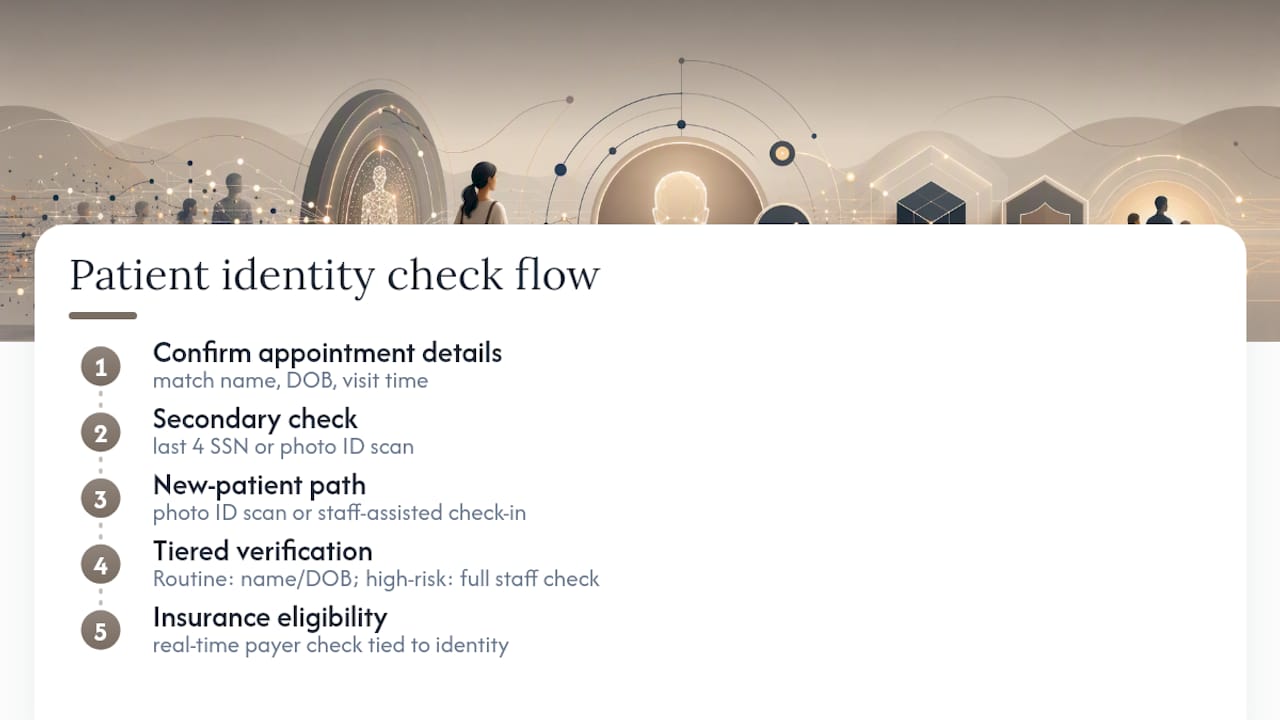
Identity verification at check-in has to balance two things that pull in opposite directions: catching mismatched or fraudulent records, and not turning every visit into an interrogation.
Most digital check-in systems verify identity through a combination of confirmed appointment details (name, date of birth, and the specific visit time) matched against the EHR record, plus a secondary check like the last four digits of a Social Security number or a photo ID scan for new patients. Returning patients who completed previsit intake usually just confirm their name and birth date on arrival, since the heavier verification already happened when they filled out their forms.
New patients need a slightly different flow. A first-time visit should route to either a staff-assisted check-in or a kiosk step that captures a photo ID, since there's no existing record to match against yet. Some clinics build tiered verification: a routine follow-up visit needs light confirmation, while a visit involving controlled substances, high-value procedures, or insurance changes triggers a fuller identity check with staff involvement.
Insurance verification is where identity and billing accuracy overlap. Real-time eligibility checks against the payer, tied to the patient's confirmed identity, catch mismatches, like a patient checking in under an old insurance plan, before the visit happens rather than during claims processing weeks later. That single step is often what separates a clean claim from a denied one, and it only works if identity verification and insurance verification are checking the same confirmed record.
How Should Clinics Handle Walk-Ins and Exceptions?
No online patient check-in rollout works for 100% of visits, and treating exceptions as an afterthought is one of the most common implementation mistakes.
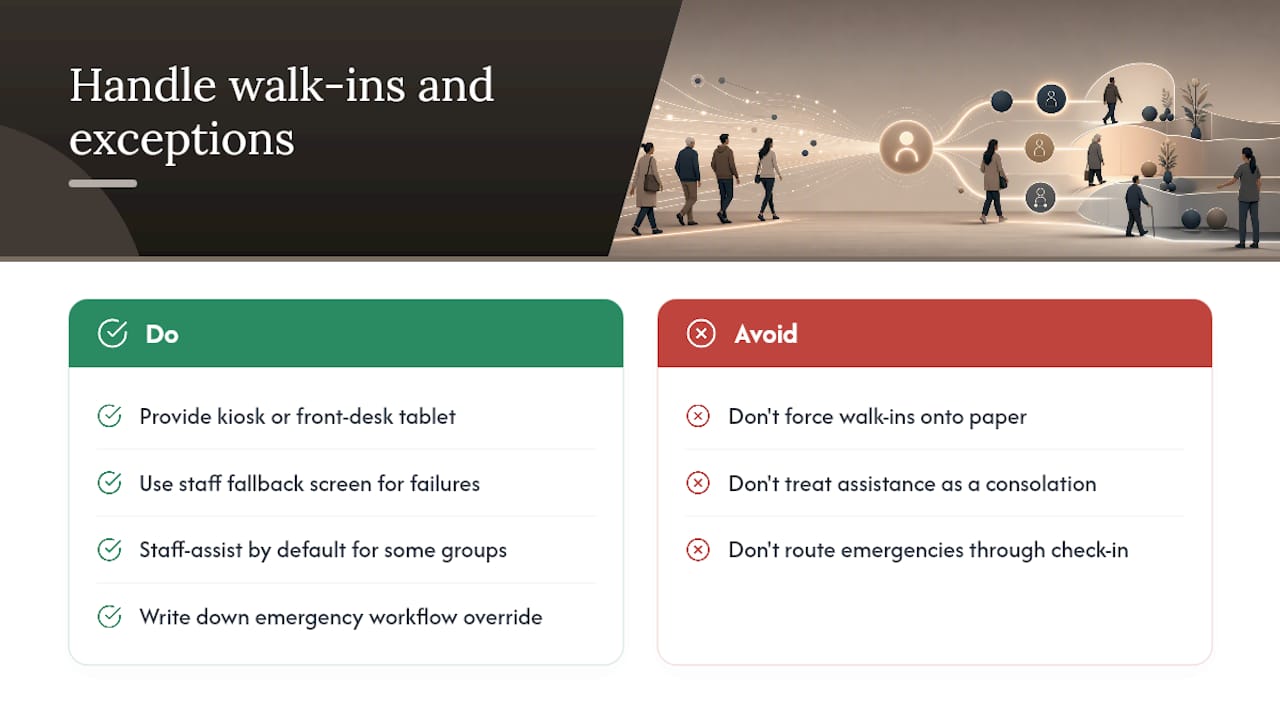
Walk-ins, patients who show up without an appointment, need a visible path into the system that doesn't require a previsit link. A kiosk or front-desk tablet where staff can create a same-day record on the spot handles this without forcing the patient back into a paper clipboard. The same applies to technical failures: if the kiosk goes down or a patient's phone won't load the check-in page, front-desk staff need a fallback screen on their own terminal to complete the same steps manually.
Some patient groups need staff-assisted check-in by default rather than as an exception. That includes patients without a smartphone or reliable data plan, patients with visual or motor impairments who struggle with a touchscreen, and non-English speakers if the system's language options are limited. Building a staffed lane alongside the self-service options, rather than treating staff assistance as a broken fallback, keeps the experience dignified instead of making it feel like a consolation prize.
Emergency or urgent cases are the clearest exception of all. A patient in acute distress should never be routed through a digital check-in flow before getting seen; that's a workflow override, not an edge case, and every rollout plan needs it written down explicitly so no one on staff has to guess in the moment.
Editorial Take: What the Data Actually Supports
The conventional pitch for online patient check-in leans hard on the kiosk, as if a shiny touchscreen in the lobby is the whole story. It isn't. The bigger win happens before the patient ever walks in, when previsit intake moves data entry out of your waiting room entirely. Clinics that treat kiosks as the primary lever, rather than the backup for people who skipped previsit forms, are optimizing the smaller half of the problem.
The bigger blind spot is the app requirement. A lot of vendors quietly assume every patient has a smartphone, a stable data plan, and the patience to download an app for a fifteen-minute visit. That assumption excludes exactly the patients who need the smoothest experience most, older adults and lower-income patients, according to research on the digital divide. Prioritize browser-first design before you evaluate anything else. Everything downstream, adoption rates, staff time saved, collection improvements, depends on patients actually using the system in the first place.
Get Started With Ezseat's Browser-Based Check-In
Ezseat is the app-free alternative to check-in systems that ask patients to download software before they can join a line. Patients scan a QR code or open a link in any browser, join the queue, and get an SMS or call when it's their turn, no account creation, no app-store friction, no lost patients at step one. For clinics running previsit intake through their EHR already, Ezseat handles the in-office arrival side: kiosk, tablet, or mobile, with a public display screen that shows status without exposing personal health information.
The setup mirrors what many clinics already run for walk-in queue management, and the QR code waitlist guide walks through configuration for teams that want the in-office side deployed fast. Ezseat offers a free two-month trial before any subscription kicks in, so a clinic can pilot the front-desk side alongside existing previsit forms with no upfront commitment. Start a trial at Ezseat and have a pilot queue running before your next full clinic day.
Sources
- Digital Patient Check-In | RevSpring
- PMC article on digital health/telehealth (source for design and accessibility findings)
- Accelerating contactless digital experiences in healthcare | J.P. Morgan Insights
- Digital divide persists even as tech adoption grows | Pew Research Center
- AMA code of medical ethics — informed consent