
Every host script that works follows one shape: acknowledge the guest, give a credible range instead of a single number, collect only what you need to reach them, tell them exactly how updates will arrive, and state how long you'll hold their spot. That structure holds whether you're seating dinner parties, calling patients back, or handing off tacos from a truck window. Swap a few nouns and the same five-step script covers all four venue types, an approach aligned with pickup waitlist etiquette rules for organizers and players to keep things smooth and fair.
TL;DR:
- Using fixed, consistent scripts for all waitlist communications ensures fairness and reduces training time for new hosts.
- Browser-based queue management tools eliminate app download friction and improve the accuracy and reliability of guest notifications.
- Automated messaging at three key points—join, warm update, and ready—maintains clear communication without host intervention.
- Clear ownership of the waitlist, with a designated lead and specific triggers, minimizes chaos and ensures timely updates.
- A short, standard hold window of around 10 minutes balances fairness for guests and line efficiency, with explicit guidelines for handling no-shows and late arrivals.
Table of Contents
- Why Queue Scripts for Hosts Need a Fixed Structure
- Copy-and-Paste Scripts for Every Venue Type
- How Technology Backs Up the Script
- Who Owns the Waitlist and When They Speak
- Communicating Clearly With Every Guest
- Training Hosts to Handle the Hard Moments
- The One-Page Reference to Pin at the Stand
- Why Browser-Based Queues Change What Hosts Say
- Put These Scripts on Autopilot
- Sources
- FAQ
Why Queue Scripts for Hosts Need a Fixed Structure
Hosts improvise under pressure, and improvisation is where waitlists fall apart. A host who says "about 20 minutes" to one couple and "maybe half an hour" to the next, using no consistent method, creates the exact unfairness the National Restaurant Association warns damages guest trust. Fixed scripts fix that. They also cut training time, because a new host can sound competent on day one instead of week three.
The fix isn't a rigid speech. It's a skeleton every host fills in with the same five moves, in the same order, every time.
Copy-and-Paste Scripts for Every Venue Type
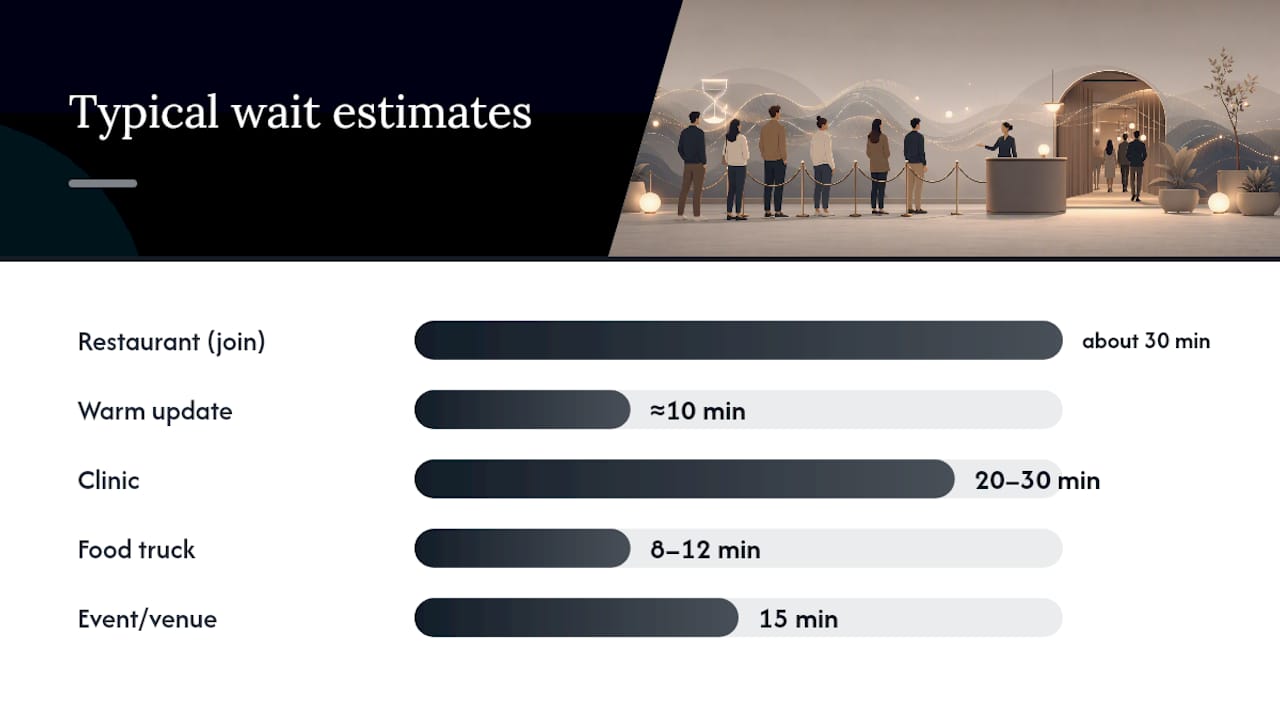
Use the short version when the line is loud or backed up. Use the full version when you have a beat of quiet.
1. The join script
- Short: "You're on the list. About a half hour. Can I get a name and number for updates?"
- Full: "Thanks for waiting. Right now we're estimating about half an hour. I'll text you when you're about ten minutes out, and again when your table's ready. Can I get your name and the best number to reach you?"
2. The warm update
- Short: "You're next up soon. Stay close by."
- Full: "Quick update. You're about ten minutes out now. No need to check back. We'll text the second we're ready for you."
3. The ready notice
- Short: "You're up. We'll hold your spot for a short time."
- Full: "Your table's ready. Come to the host stand whenever you're set. We can hold this for a few minutes before we offer it to the next party."
Venue variants keep the same bones:
- Clinic: "You're checked in. Dr. Alvarez is running about 20 to 30 minutes behind. I'll text you when the room opens."
- Food truck: "Order's in. About 8 to 12 minutes for the fry oil to catch up. I'll call your name when it's up."
- Event/venue: "You're on the entry list. About 15 minutes until the next group goes in. We'll text when it's your turn."
Notice the ranges, not exact minutes. A single number ("12 minutes") reads as a promise; a range reads as an honest estimate, which matters more than it sounds.
How Technology Backs Up the Script
A script only holds up if the tools behind it don't slow the host down. Browser-based, no-app entry matters here more than most hosts realize: a guest who has to download something before joining a line abandons the process or, worse, gives you a fake number to move faster. Letting people join via a QR code straight from a phone browser keeps the join script fast and the data behind it accurate.
Three moments are worth automating:
- Join confirmation, sent the instant a guest signs up, so the host never has to remember to say "you'll get a text."
- Warm update, triggered automatically around the 10-minute mark, matching what a tech-enabled waitlist workflow is built to do without a host lifting a finger.
- Ready notice, fired the moment a table, room, or order status flips.
For a guest without a working phone, fall back to a paper ticket with a written estimate, and log their name at the stand instead. Never require a phone as the only path to the queue.
Pro Tip: Keep a laminated card at the stand with your default ranges by day part (lunch vs. dinner rush, morning vs. afternoon clinic block) so hosts aren't guessing the number under pressure.
Who Owns the Waitlist and When They Speak
Chaos at the stand usually traces back to unclear ownership, not bad scripts. Fix that first.
- Name one lead during peak hours. That person makes the final seating call, even if three other staff members are helping guests join the line.
- Trigger messages at three fixed points: join (capture name, contact, estimate), warm update (party is close), and ready (with a stated hold window). Whoever seats or serves the previous party triggers the next message. Nobody waits for "someone" to notice.
- Split what you record from what you say. Staff can log party size, accessibility notes, or seating preference. Guests only need to hear their estimate, the next action, and how they'll be reached, a division that keeps phone-based queue notifications simple even as your internal records get more detailed.
Communicating Clearly With Every Guest
Effective communication at the stand isn't optional politeness. It's a real requirement. ADA guidance directs businesses to offer effective communication aids and give primary consideration to the guest's preferred method, not whatever's most convenient for staff.
Keep three low-effort options ready:
- A written card with the estimate and hold window, for guests who prefer reading over hearing.
- Pen-and-paper exchange when speech isn't the easiest channel in the moment.
- A text-only update path for guests who'd rather not stand and wait for a name to be called.
Full sign-language interpretation or specialized aids aren't always required if they'd impose an undue burden, but a reasonable alternative almost always is.
Training Hosts to Handle the Hard Moments
No-shows, late returns, and impatient guests break scripts faster than anything else. Train for them directly, not around them.
- Run 10-minute role-play drills weekly: one person plays an upset guest, another practices the hold-window script without apologizing excessively or over-promising.
- For a no-show past the hold window: "We held your spot for 10 minutes and had to seat the next party. I can get you back on the list right now."
- For a frustrated guest mid-wait, send a genuine progress update rather than small talk. Cornell's research on waiting perception found truthful updates cut dissatisfaction more than distractions ever do.
Pro Tip: End every shift with a two-minute review: which estimates ran long, which ran short, and why. That's how ranges get more accurate over time.
The One-Page Reference to Pin at the Stand
Capture only what earns its place: name, contact method, party size or service type, and the timestamp the guest joined. Each field answers a real question later. The timestamp alone settles most "how long have I been waiting" disputes.
- Join, warm, and ready scripts (short versions from above), printed in full.
- A default hold window: typically a short standard period for restaurants and events, slightly longer for clinics running behind schedule.
- A rule for pausing the list: only the shift lead can pause new joins, and only when the kitchen, provider, or venue capacity genuinely can't absorb more.
| Field | Why it matters |
|---|---|
| Name + contact | Enables the warm and ready notifications |
| Party size / service type | Matches guest to correct table, room, or order |
| Join timestamp | Settles wait disputes, tracks real vs. quoted time |
| Hold window used | Confirms when a no-show forfeits their spot |
Why Browser-Based Queues Change What Hosts Say
Ezseat built its queue tool around one belief: every app download between a guest and the line is friction that shows up later as a host's problem. When guests join by browser, the join script gets shorter because there's nothing to explain about installation. Notifications land more reliably, too, since a guest who joined in ten seconds is far less likely to have typed their number wrong. That's the whole case for no-app entry: it doesn't just help guests, it makes the host's script easier to deliver correctly, shift after shift.
— Ezseat
Put These Scripts on Autopilot
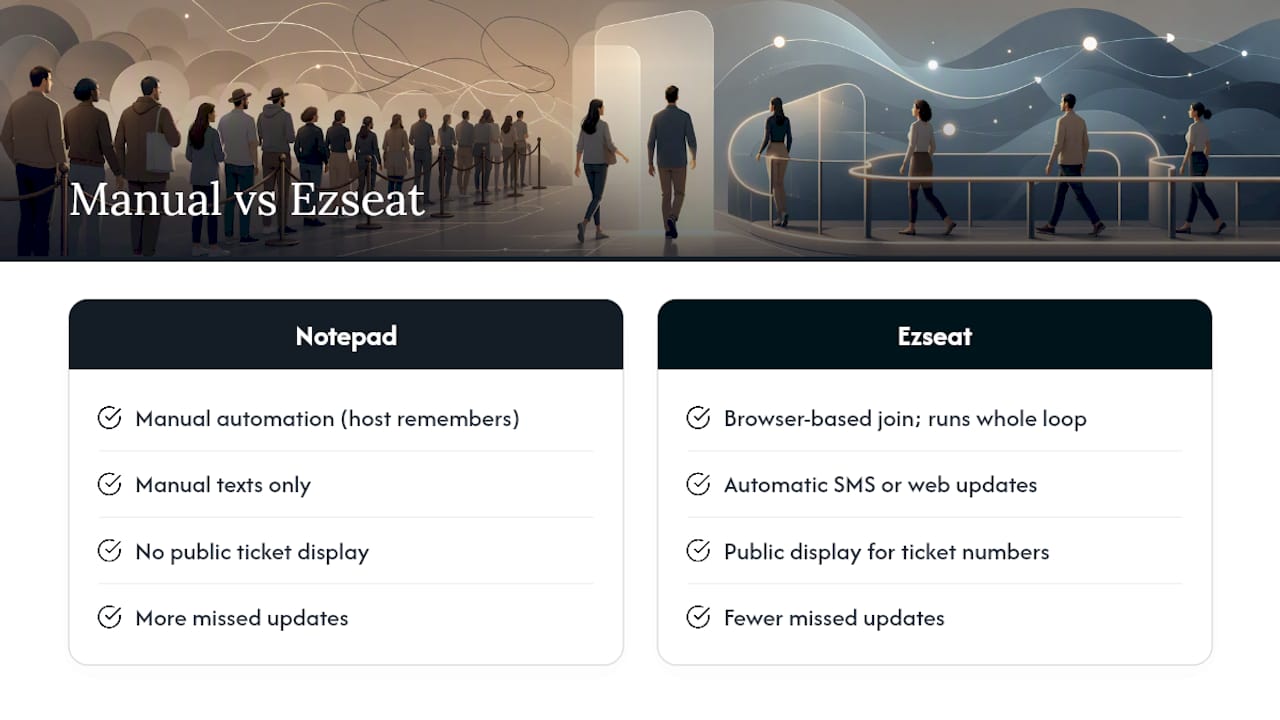
Writing the scripts is half the job. The other half is making sure they fire on time, every time, without a host having to remember. Ezseat runs the whole loop, browser-based join, automatic SMS or web updates at the warm and ready moments, and a public display for ticket numbers, so the five-step structure in this article happens without anyone standing at the stand typing texts by hand. That's the practical edge over a pen-and-paper board: fewer missed updates, fewer guests wandering off wondering if they've been forgotten, and a paper trail if a hold-window dispute comes up.
Plans start with a free two-month trial, then move to Light at $3.90 a month or Pro at $14.90 a month, whichever matches how many queues you're running. If your stand is still working off a notepad, that's the moment to check out Ezseat's setup and see how fast a browser-based line goes live.
Sources
For the research behind these scripts: Cornell's work on waiting perception covers truthful updates, Cornell's service-pace study covers credible estimates, ADA guidance covers accessibility, and the National Restaurant Association covers fairness at arrival.
- Cornell hospitality research on waiting and perception
- ADA Requirements: Effective Communication
- National Restaurant Association commentary on reservations
FAQ
What Should a Host Say When a Guest Joins the Queue?
Acknowledge them, give a range instead of an exact number, and collect a name plus contact method in one breath. Something like "You're on the list, about 25 to 35 minutes, can I get a name and number for updates?" covers all three in one line.
How Long Should a Table or Spot Be Held?
A 10-minute hold window is standard for restaurants and events, giving late guests a fair chance without stalling the line behind them. Clinics running behind schedule often extend that slightly, but the window should always be stated out loud at the ready notice.
Does Ezseat Require Guests to Download an App?
No. Ezseat runs entirely through a web browser, so guests join, get updates, and check their spot without installing anything, which is the core reason it lowers no-shows and mistyped contact details compared to app-based systems.
How Often Should Hosts Send Progress Updates?
Two automated touchpoints work best: a warm update around 10 minutes out and a ready notice the moment a spot opens. Cornell's research on waiting perception found truthful updates reduce guest frustration more reliably than filling the wait with distractions.
What Should Hosts Do if a Guest Can't Use a Phone?
Offer a paper ticket with a written estimate and log their name at the stand as a manual fallback. ADA guidance directs businesses to give primary consideration to the guest's preferred communication method, not just the fastest one for staff.