
A virtual queue callback (also called a virtual hold) lets you hang up the phone, keep your place in line, and receive an outbound call when an agent or boarding slot is ready for you. If you miss that call, the system typically retries once or twice within a short window before marking your request as abandoned and releasing your position. The single best immediate action: check your app or SMS messages right away and accept any automatic retry, or contact guest services before your spot is gone.
Key facts at a glance:
- What it is: A callback queue system that replaces passive hold time with an outbound call triggered when your position nears the front.
- Technology behind it: Automatic Call Distributors (ACD) and Interactive Voice Response (IVR) systems manage queue position and initiate the outbound call.
- If you miss it: Most systems attempt one or two retries within a short window, then mark the interaction abandoned. Theme parks often allow a cast member override with proof; contact centers rely entirely on automated retry logic.
- First action: Open the app or check your texts immediately. For parks, head to Guest Services with your app screenshot.
Table of Contents
- How a virtual queue callback actually works, step by step
- Where virtual queue callbacks are used and how policies differ
- What actually happens when you miss a callback
- Practical steps to avoid missing a callback and what to do if you do
- How operators should design retry and grace policies
- How Ezseat configures callbacks and surfaces retry behavior to staff
- Key Takeaways
- The part most systems get wrong about customer control
- Ezseat makes missed callbacks easier to prevent and recover from
- Useful sources and further reading
How a virtual queue callback actually works, step by step
The flow is straightforward, but the details matter when you're trying to understand why a missed call costs you your place.
| Flow Stage | What the System Does | What You See or Hear |
|---|---|---|
| 1. Offer | Queue detects wait time exceeds threshold; callback option presented | IVR prompt, app pop-up, or web page offer |
| 2. Enrollment | System captures your phone number (ANI or entered digits) and validates it | Confirmation screen or voice confirmation |
| 3. Placeholder | Virtual position held in queue; you hang up | App shows estimated wait; SMS sent |
| 4. Monitoring | ACD tracks queue progress in real time | EWT updates in app or no visible update |
| 5. Trigger | Position nears front; outbound call initiated | Your phone rings from the system number |
| 6. Confirmation intercept | IVR prompts you to confirm you're ready | "Press 1 to connect to an agent" |
| 7. Connection | Confirmed: routed to live agent. Not confirmed: retry or abandon | Live conversation begins, or retry call follows |
When you opt into a callback, the system captures your number, preserves your virtual position, monitors queue progress, and initiates an outbound call as your position approaches the front. The confirmation intercept at stage 6 is not just a formality. It protects agent time by filtering out voicemails, wrong pickups, and distracted answers before a live agent is ever connected.
Immediate vs. scheduled callbacks behave differently in practice. An immediate callback fires as soon as your position reaches the front, which means the timing is unpredictable from your side. A scheduled callback lets you pick a time window, so you know roughly when to expect the call. Scheduled callbacks tend to have higher connection rates because you chose the window and are more likely to be available.
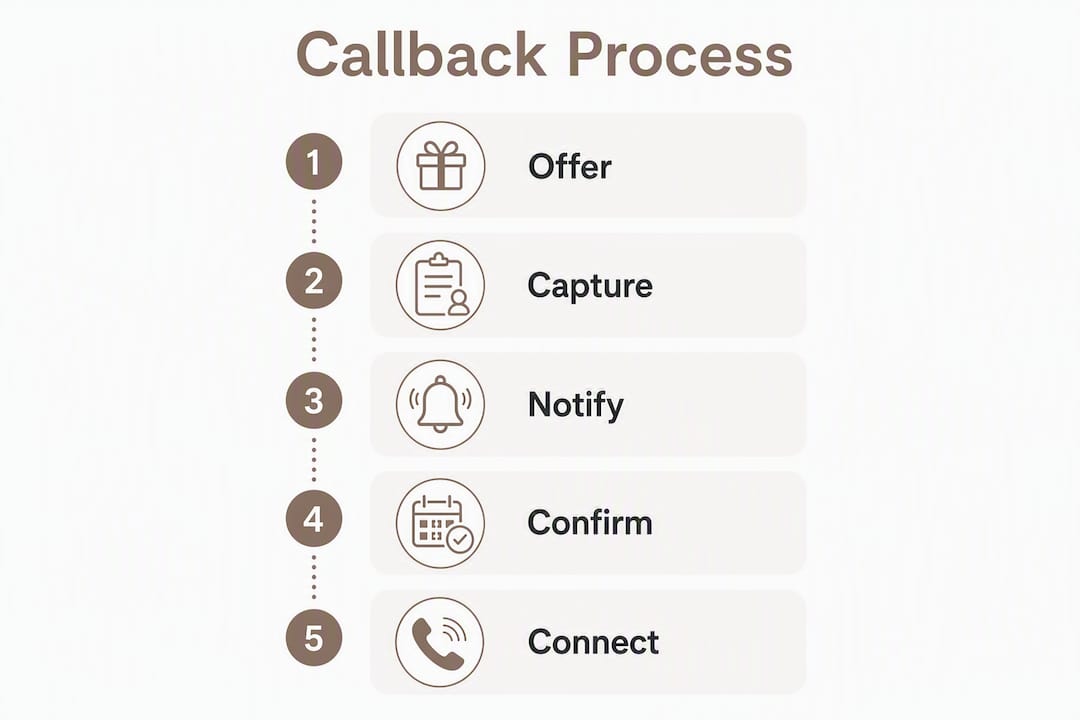
A rough timeline example: in a contact center with a 20-minute estimated wait, an immediate callback typically fires 18–22 minutes after enrollment. A scheduled callback in a 30-minute block (say, 2:00–2:30 PM) fires sometime in that window, with a confirmation prompt giving you 60–90 seconds to press 1.
Pro Tip: Add the callback number to your contacts before you enroll. Many systems call from a generic or toll-free number that looks like spam, and declining it means losing your place.
Where virtual queue callbacks are used and how policies differ
The same underlying technology runs in very different environments, and the rules for missed callbacks shift significantly depending on where you are.
Contact centers are the most common setting. Customer support lines for airlines, banks, telecom providers, and insurance companies all use callback queue systems to reduce abandonment. Policies here are almost entirely automated: the system retries, logs the outcome, and moves on. There is no human override.

Theme parks and entertainment venues use a variant closer to a virtual boarding group. Disney's Lightning Lane and similar systems notify guests via app push notification rather than a phone call, but the underlying logic is the same: your position is held, you're notified when it's your turn, and missing the window costs you your slot. The key difference is that park staff can often manually override the system for guests who missed their window, especially near park closing or when a cast member can verify the original registration.
Restaurants and retail typically use SMS-based systems. You receive a text when your table or service slot is ready, with a reply window of a few minutes before the next party is called. Browser-based queue entry via QR code is common here, meaning no app download is required.
Clinics and healthcare check-ins use scheduled callback windows more often than immediate callbacks, since appointment timing is more predictable. Patients receive an SMS or voice call when the provider is ready, with a grace window that's usually longer than a contact center's 60-second window. For a deeper look at how clinic queue management handles patient notifications, the policies differ meaningfully from retail settings.
Event access and appointment systems often combine a web-based waiting room with a scheduled callback or push notification for entry. Music venue presales, government service appointments, and vaccination clinics have all used this model.
How to tell which system you're in:
- Email or web notification: — Appointment or event system. Check your inbox and follow the link.
What actually happens when you miss a callback
Missing a callback is not always fatal to your place in line, but the outcome depends heavily on the system type and how quickly you respond.
Standard automated behavior in contact centers follows a predictable pattern. When the outbound call goes unanswered, the system attempts an immediate retry, then a second recall attempt after a short interval. Once the maximum configured recall attempts are exhausted, the request is flagged as abandoned and the position is released. The caller must rejoin the queue from scratch.
Grace windows for immediate callbacks are typically 30–90 seconds at the confirmation intercept stage. If you pick up but don't press 1 in time, the system treats it as a no-answer and retries. Scheduled callbacks have a looser tolerance since the window is pre-agreed, but they still expire if the call goes unanswered through all retry attempts.
| Scenario | User-Visible Outcome | What the System Records |
|---|---|---|
| Answered and confirmed | Connected to agent or boarding group | Callback completed, position fulfilled |
| Missed, retry answered | Short delay, then connected | Retry attempt logged, callback completed |
| Missed, all retries failed | Position released; must rejoin | Abandoned, no-show flag, position voided |
| Missed, park staff override | Manually reinstated with proof | Manual override logged by staff |
| Scheduled window missed | Position released at window end | No-show, window expired |
Theme parks handle this differently. Because the stakes feel higher to guests (you waited all day for that ride), most major parks build in a human safety net. If you missed your boarding group notification, going to Guest Services with your app screenshot showing the original registration is often enough for a cast member to reinstate you, especially if the park hasn't closed the ride for the day. This is not guaranteed, and it varies by park and day, but it's worth attempting before assuming your slot is gone.

Contact centers offer no equivalent. Once the system marks a request abandoned, the only path forward is calling back and rejoining the phone call queue from the beginning.
Practical steps to avoid missing a callback and what to do if you do
Prevention is simpler than recovery. A few habits before you enroll cut the no-show risk significantly.
Before you enroll:
- Enable push notifications for the relevant app and make sure Do Not Disturb is off.
- Add the callback number to your contacts if the system tells you what number it will call from.
- Use a headset or earbuds so you can hear the call even if your phone is in your pocket.
- Monitor the app or SMS window actively as your estimated wait time drops below five minutes.
- Choose a scheduled callback window when the option is available. Scheduled callbacks connect at higher rates because you picked the time.
If you miss the call:
- Check your app and SMS messages immediately for a retry notification or a rejoin link.
- If a second call comes in from an unfamiliar number, answer it and press 1 without hesitation.
- For contact centers: call the main number back, explain you had a callback request, and ask if a reference ID was logged. Some systems can reprioritize you.
- For theme parks: go directly to Guest Services with your phone showing the original boarding group registration. Don't wait; the window for staff override narrows as the day goes on.
- For restaurants: reply to the SMS immediately or walk in and speak to the host. Most SMS systems have a short grace window before the next party is called.
Pro Tip: If you're in a contact center queue and expect a long wait, open the app on a second device or tablet so you can monitor the estimated wait time while using your phone normally. When the EWT drops to two or three minutes, put everything else down.
How operators should design retry and grace policies
Getting callback policy right is one of the highest-leverage decisions a contact center or venue manager makes. The wrong settings either flood your outbound dialer with unnecessary calls or leave customers stranded with no retry.
The case for callbacks starts with abandonment. Some implementations report 20–50% reductions in call abandonment after adding callback options. Beyond the number, callbacks smooth staffing peaks by spreading demand across time rather than stacking it in real-time queues.
Threshold triggers are the most important tuning parameter. Offering a callback when the estimated wait time (EWT) is only two minutes adds outbound cost without meaningful customer benefit. Optimized systems offer callbacks only when EWT exceeds a configured limit, typically 5–10 minutes, so the offer is genuinely useful. Below that threshold, the caller is better served by simply waiting.
Confirmation intercepts protect agent time. Intercepting the outbound call with a short IVR prompt asking the recipient to confirm availability before routing to a live agent filters out voicemails, wrong pickups, and distracted answers. Without this step, agents spend talk time on dead air.
Retry and recall strategy should be explicit, not left to defaults. A sensible starting point: one immediate retry if the first call is unanswered, one scheduled recall attempt 5–10 minutes later, and a final abandonment flag if both fail. More than two retries tends to annoy customers who genuinely missed the call and have already rejoined the queue another way.
Metrics to track:
- Abandonment rate (before and after callback implementation)
- Callback connection rate (calls answered and confirmed vs. total outbound attempts)
- No-show rate (callbacks attempted but never answered through all retries)
- Average speed of answer (ASA) for callback vs. standard inbound
- Cost per outbound attempt (especially relevant when outbound volume is high)
For operators using on-site displays alongside callbacks, a queue display screen showing live position updates reduces anxiety and cuts the number of customers who abandon before their callback fires.
How Ezseat configures callbacks and surfaces retry behavior to staff
A web-based queue system like Ezseat shows how these principles translate into practical operator settings without requiring enterprise-level infrastructure.
Core features relevant to callback management:
- Browser-based queue entry via QR code or kiosk, so customers join without downloading an app
- SMS and voice notifications sent when a customer's position nears the front
- Scheduled callback windows configurable in 15–30 minute blocks
- Confirmation intercept built into the outbound notification flow
- Retry parameters adjustable per queue (number of attempts, interval between retries)
- Public display screen integration showing live ticket numbers for walk-in customers
- Staff dashboard with alerts for no-shows and manual override capability
Sensible defaults for a small business running a restaurant, barbershop, or clinic:
- Offer callback when EWT exceeds 7 minutes
- Two retry attempts, spaced 60–90 seconds apart
- Confirmation window of 60–90 seconds at the intercept prompt
- Scheduled windows in 15-minute blocks during peak hours
- Staff alert triggered after two failed retries so a team member can follow up manually
Reporting in a system like this should surface callback success rates, average time-to-connection, no-show counts by day and hour, and a log of manual overrides. That data tells you whether your retry settings are working or whether customers are consistently missing calls during a particular time window, which usually points to a notification delivery problem rather than a customer behavior problem. SMS delivery channel choice matters here; the short code vs. 10DLC decision affects whether your notification even reaches the customer's phone before the callback fires.
Key Takeaways
A virtual queue callback preserves your place in line so you can hang up, and missing the outbound call typically triggers one or two automated retries before your position is released.
| Point | Details |
|---|---|
| Miss a callback: act immediately | Check your app or SMS right away and accept any retry call before the window closes. |
| Parks vs. contact centers | Parks often allow staff override with proof; contact centers rely on automated retries only. |
| Scheduled callbacks reduce no-shows by letting customers choose a convenient time window, thereby improving connection rates. | |
| Operators: use threshold triggers | Only offer callbacks when the estimated wait time exceeds a minimum threshold to avoid unnecessary outbound cost. |
| Ezseat for operators | Ezseat provides browser-based queue entry, SMS/voice notifications, configurable retry settings, and a staff dashboard for manual override without requiring customers to download an app. |
The part most systems get wrong about customer control
The real value of a callback isn't efficiency. It's agency. Letting customers leave the phone and manage their own time transforms waiting from something that happens to them into something they're participating in. That shift in perception matters more than the actual time saved.
What frustrates people isn't the wait itself. It's the feeling of being trapped. A callback removes the trap. The problem is that operators often undermine this by designing retry logic that's too aggressive or too passive. Aggressive retry (calling back every 30 seconds three or four times) feels like harassment. Passive retry (one attempt, then abandon) punishes customers for a momentary distraction. Neither builds trust.
The entertainment setting makes this tension visible in a way contact centers rarely do. A theme park guest who misses their boarding group notification has often been waiting since park open, navigating crowds, managing kids, and watching their phone obsessively. When they miss the ping by 90 seconds, the emotional response is disproportionate to the technical event. The parks that handle this well have trained cast members who treat the manual override as a service recovery moment, not a policy exception. That human layer is what turns a frustrated guest into a loyal one.
Contact centers don't have that luxury, which is exactly why the confirmation intercept and the scheduled callback option matter so much. They're the closest thing to a human safety net that an automated system can offer. Operators who skip them to save configuration time are trading short-term simplicity for long-term abandonment.
Ezseat makes missed callbacks easier to prevent and recover from
Running a queue without the right notification setup means customers miss their turn, staff scramble to recover, and the line backs up. Ezseat is built specifically for the operators who can't afford that friction: restaurants, clinics, food trucks, barbershops, and event venues that need a queue system working from day one without asking customers to download anything.

With Ezseat, customers join via a web browser, receive SMS or voice notifications when their turn is near, and staff get a live dashboard showing who's been notified, who hasn't responded, and where manual follow-up is needed. Retry settings, confirmation windows, and scheduled callback blocks are all configurable without touching a line of code. The result is fewer no-shows, simpler recovery when someone does miss a notification, and a staff team that spends less time chasing customers and more time serving them.
Start a free two-month trial at Ezseat and see how the notification and retry settings work for your specific queue setup.
Useful sources and further reading
The following sources were used to build this article and are worth reading if you want to go deeper on any specific aspect of virtual queue callbacks.
- What Is a Virtual Hold – Five9: Clear vendor-level definition of virtual hold and how the callback replaces hold time. Good starting point for anyone new to the concept.
- What Is Virtual Hold? – VisionPoint Systems: Detailed walkthrough of the callback flow steps, including the distinction between immediate and scheduled callbacks.
- Queue Callback – NiCE Glossary: Industry glossary entry covering abandonment reduction data and the business case for callbacks.
- What Is Queue Callback in Contact Center – VoiceSpin: Explains retry logic, maximum recall attempts, and abandonment marking in contact center systems.
- Virtual Queue – Wikipedia: Covers the broader history and variants of virtual queuing, including theme-park applications and staff override behavior.
- Bright Pattern Virtual Queue Tutorial: Technical implementation guide showing confirmation intercept configuration, ANI validation, and agent panel alerts.
- Do Virtual Queues Work? – SmartCustomerService: Expert column on the customer agency argument for callbacks and what actually drives satisfaction.
- Stop Losing Customers on Hold – Computer-Talk: Best-practice guidance on threshold triggers, over-offering risks, and outbound cost management.
- Webex Callbacks: Putting Customers in Control – Webex Blog: Covers scheduled vs. immediate callback connection rates and the customer-control framing.
- Setup: Call Queue – Microsoft Teams | Microsoft Learn: Practical configuration reference showing how wait-time thresholds trigger callback eligibility in a real enterprise platform.