Customer queue privacy means limiting, protecting, and properly handling the personal information your queue system collects, from names and phone numbers to timestamps and IP addresses. Start with three controls: encrypt data in transit and at rest, restrict staff access on a need-to-know basis, and set a retention window that automatically deletes queue records once they're no longer useful. Confirm whether GDPR or CCPA/CPRA applies to your customer base, and know exactly who on your team (or your vendor's team) to call if something goes wrong.
TL;DR:
- More than just encryption, it is crucial to restrict staff access and set automatic data retention to minimize privacy risks.
- Public display screens should mask full names and only show ticket numbers, especially to prevent visible leaks from passersby.
- Physical privacy measures like screen angle positioning, barriers, and kiosk placement are vital to prevent shoulder surfing and accidental information exposure.
- Staff training must emphasize privacy best practices, including proper masking, limited data collection, and incident response procedures.
- Choosing a queue system that operates through a browser without app installation reduces the number of vulnerable data collection points.
Table of Contents
- Privacy Risks Unique to Queue Systems, and the Rules That Govern Them
- Best Practices for Queue Privacy That Actually Hold Up in an Audit
- An Implementation Checklist You Can Hand to Leadership
- How Ezseat's Design Approach Maps to These Controls
- Physical Privacy in the Waiting Area Matters as Much as the Software
- Designing Against Shoulder Surfing and Accidental Visual Leaks
- Training Staff to Handle Sensitive Queue Information
- Privacy Is a Customer Experience Decision, Not Just a Compliance One
- A Queue Platform Built Around Fewer Places for Data to Leak
- Where to Go for Deeper Guidance
- Sources
- FAQ
Privacy Risks Unique to Queue Systems, and the Rules That Govern Them
A queue system looks harmless until you list what it actually touches: names on a public screen, phone numbers tied to SMS alerts, IP addresses logged when someone joins from their phone, sometimes appointment reasons or party details typed into a custom field. Each of those is a small leak waiting to happen.
Where queue-specific exposure actually happens:
- Public display boards that show full names instead of ticket numbers, visible to anyone standing nearby.
- SMS or call notification tokens that, if intercepted or misconfigured, expose a customer's queue status or return link to someone else.
- Server logs that capture IP addresses, device data, and timestamps long after the transaction that created them is over.
- Custom intake fields (symptoms, party size, special requests) that collect more than the queue function needs.
- Shared staff devices left logged in, letting anyone walk up and scroll through the day's customer list.
Customer data protection covers exactly this: the practices and technology that keep personal information away from people who have no business seeing it. For most operators, that obligation isn't optional. The GDPR and CCPA/CPRA both require a lawful basis for collecting data, give customers the right to access, correct, or delete what you hold, and impose real penalties for noncompliance, sometimes in the millions, plus the reputational damage that follows a public breach. Clinics face an added layer: anything resembling a health detail in a queue field can trigger HIPAA-relevant obligations, which is a different compliance bar than a restaurant waitlist.
Best Practices for Queue Privacy That Actually Hold Up in an Audit
Treat privacy as infrastructure, not an afterthought bolted onto your queue app. The technical baseline is well established: cloud queue security guidance points to encryption, access control, monitoring, and data minimization as the four pillars that matter most.
- Encrypt everything, both ways. Use TLS for any data moving between a customer's browser and your servers, and AES-256 or an equivalent standard for anything sitting in storage. Key management sounds abstract until a departing employee still has access; rotate keys on a schedule and never hardcode them into app configs.
- Lock down access by role. A host stand employee doesn't need the same visibility as an owner reviewing monthly reports. Role-based permissions, mandatory multi-factor authentication for staff logins, and detailed audit logs (who viewed what, and when) turn "we think it's secure" into something you can actually prove.
- Collect only what the queue needs to function. A name and a phone number often does the job. Skip the birthday field, the address field, anything that isn't earning its place. Where possible, let customers join anonymously or with a pseudonym tied to a ticket number instead of a full name.
- Get explicit consent for notifications. Record opt-ins for SMS or call alerts, keep sensitive details out of message bodies, and mask identifiers on public-facing displays, ticket numbers instead of surnames, initials instead of full names.
- Vet your vendors like you'd vet a landlord. Any third party touching queue data should sign a Data Processing Agreement, disclose where data physically lives, and provide security attestations on request. Some vendors, like Queue-it, publish detailed privacy statements listing exactly what they collect and who to contact, which is the standard you should hold every vendor to.
- Test it, don't just trust it. Schedule vulnerability scans, run periodic penetration tests, and conduct a privacy audit at least annually. Data protection works as a lifecycle, not a one-time setup, which means the controls you configured at launch need revisiting as your business and your vendor stack change.
Pro Tip: Masking names on public queue displays costs nothing to implement and closes one of the highest-visibility privacy gaps in any waiting room. If your current system shows full names on a screen anyone can read, fix that before anything else on this list.
An Implementation Checklist You Can Hand to Leadership
Break the work into three windows so it doesn't stall out as one giant unfunded project.
Right now:
- Publish or update a privacy notice that plainly states what queue data you collect and why.
- Strip optional fields from your intake form down to the minimum needed to serve the customer.
- Confirm TLS is active on every customer-facing page and that stored data is encrypted by default.
Within 30 days:
- Review every staff account's access level and enable MFA across the board.
- Sign or renew DPAs with every vendor touching customer data, including your queue platform.
- Verify your retention settings actually delete records on schedule, not just in policy language.
Within 90 days:
- Run a tabletop incident response exercise so your team isn't improvising during a real breach.
- Schedule a penetration test with a qualified third party.
- Set measurable privacy KPIs, like a monthly access log review, so this doesn't quietly lapse.
Backups deserve their own line item here. Regular audit logging paired with scheduled backup restoration tests is what separates a compliance policy that looks good on paper from one that survives contact with an actual outage. For a step-by-step version of this, the queue disaster recovery playbook walks through what to keep, how long, and when a customer or regulator notification clock starts ticking.
How Ezseat's Design Approach Maps to These Controls
Ezseat runs entirely in a browser, so customers join a queue without installing an app or handing over the extra permissions an app install typically demands. Less software on the customer's phone means fewer places for data to leak, and fewer permissions to explain in a privacy notice.
Operators setting up or auditing Ezseat should confirm a few configuration points directly:
- Retention windows for stored queue entries, and whether old tickets clear automatically.
- Notification opt-in settings for SMS or call alerts, so customers explicitly agree before being contacted.
- Display masking options on public screens, showing ticket numbers rather than full names.
Physical Privacy in the Waiting Area Matters as Much as the Software
A perfectly encrypted database does nothing for the customer standing at your counter while a stranger reads their name off a screen three feet away. Physical layout is half of queue privacy, and it's the half most operators overlook.
Position public display screens so they're visible from the queue line itself but not from adjacent seating, sidewalks, or windows facing the street. A screen angled toward foot traffic outside your restaurant broadcasts customer names to anyone walking by, which is a privacy failure that has nothing to do with software.
Physical barriers help too. A simple stanchion line, a partition at a reception desk, or even a few feet of distance between the check-in point and the general waiting area reduces how much a stranger can overhear when a customer gives their name, phone number, or reason for visiting. Clinics in particular should treat the intake counter the way a pharmacy treats its consultation window: close enough for privacy, far enough that the next person in line isn't listening.
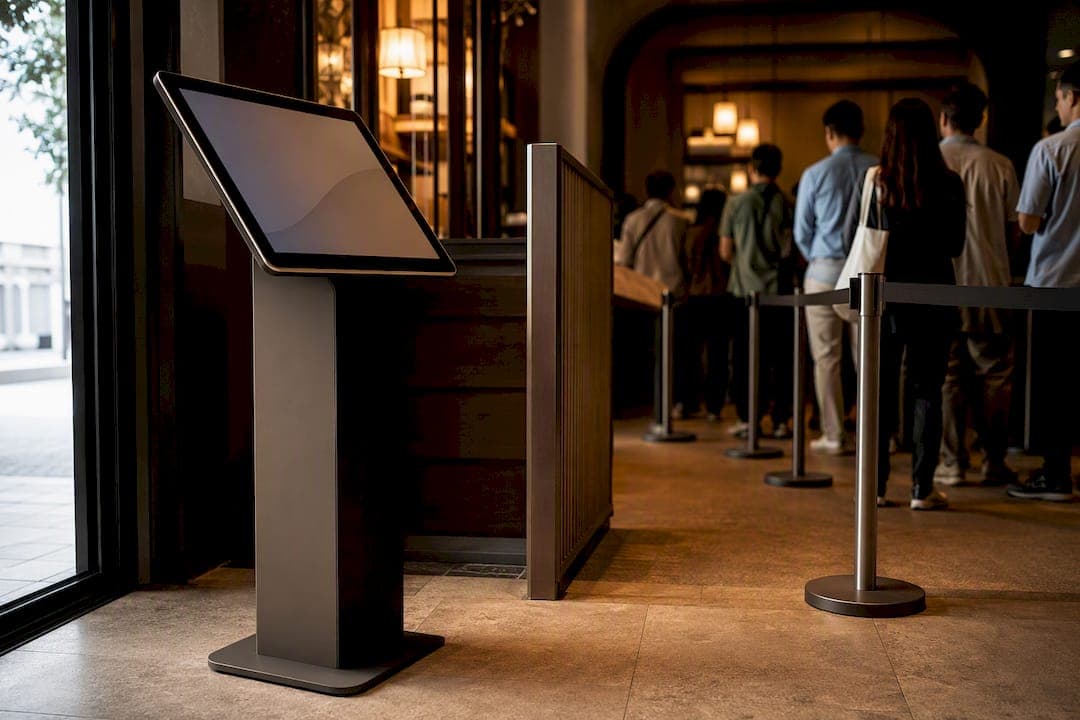
Reception kiosks deserve the same scrutiny. If a kiosk screen faces a busy hallway, anyone passing by can read whatever the current customer just typed in. Angling kiosks toward a wall, adding a privacy film, or simply moving them a few feet from high-traffic paths solves this without a single line of code changing. It's the cheapest privacy upgrade most businesses never make.
Designing Against Shoulder Surfing and Accidental Visual Leaks
Shoulder surfing sounds like a security-conference term, but it happens constantly in queue settings: someone glances at a screen over another customer's shoulder, or a staff tablet left face-up on a counter shows the next ten names in line. Design choices at the interface level can close most of this gap.
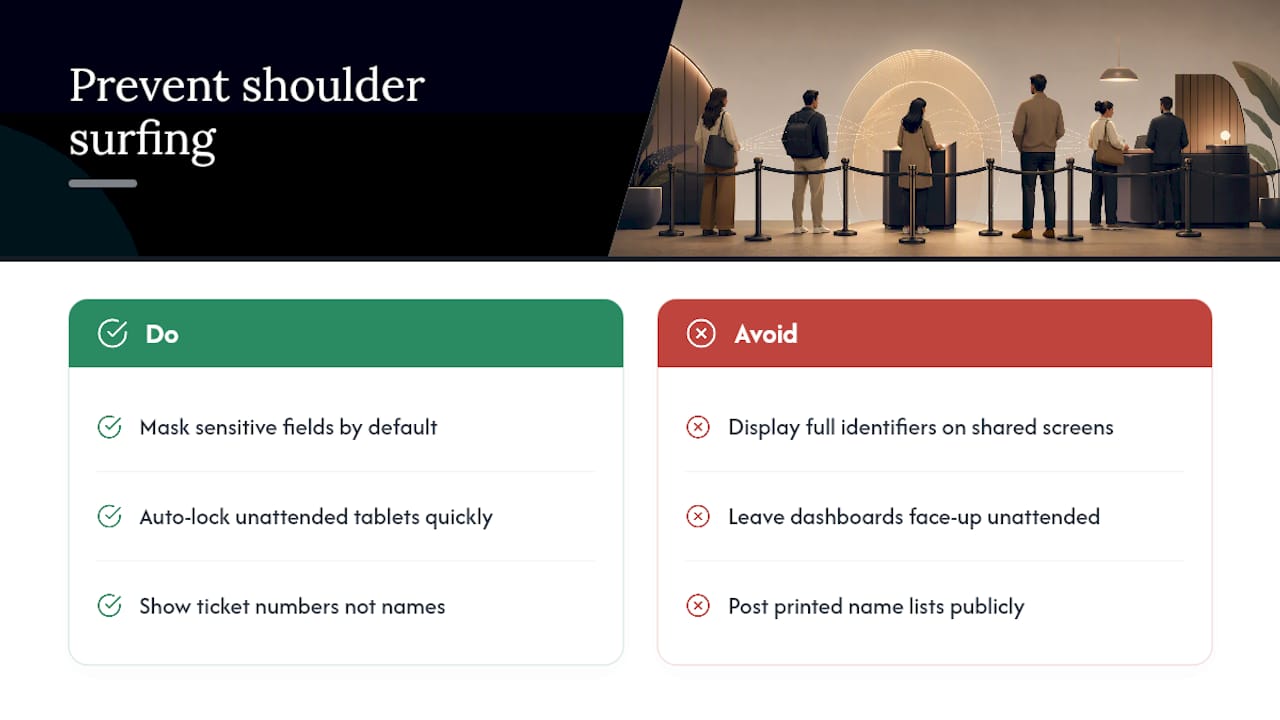
Mask sensitive fields by default. If your intake form collects a phone number or an appointment reason, don't display the full string on a shared staff screen when a shortened or truncated version does the job just as well. Masking and minimal display of identifiers rank among the highest-impact, lowest-cost controls available specifically because queue systems rely so heavily on public and semi-public screens.
Auto-lock any tablet or kiosk left unattended for more than a minute or two. Staff walk away from the front desk constantly, and a queue dashboard left open on a counter is an open book to the next person who walks up. Position staff-facing screens at an angle that isn't readable from the customer side of the counter, and default to ticket numbers on anything a customer or bystander might glimpse.
Print and paper deserve a mention too. A printed list taped to a wall or left on a clipboard at the host stand is a shoulder-surfing risk with zero digital protection possible. If your process still involves paper, treat it with the same masking logic as the screen: numbers, not names.
Training Staff to Handle Sensitive Queue Information
The best encryption in the world doesn't help if an employee reads a customer's name and appointment reason out loud across a crowded lobby. Staff behavior is the last line of defense, and it's the one most businesses train the least.
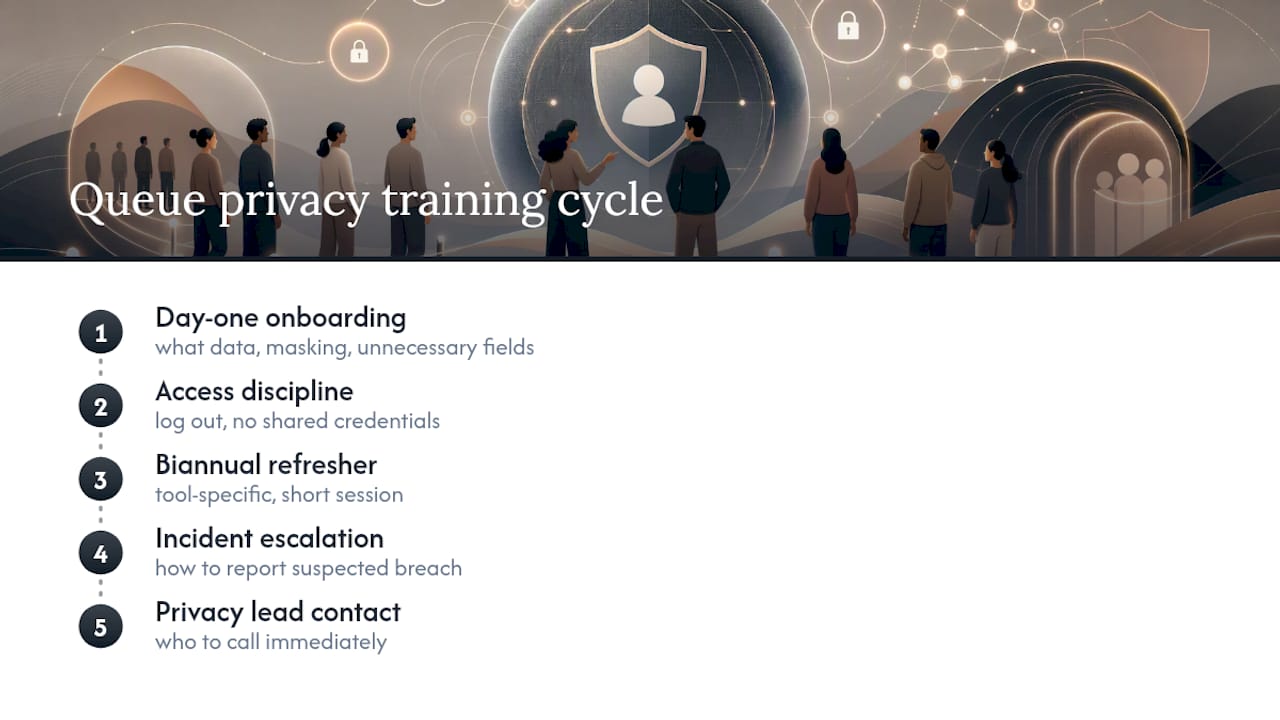
New hires should learn queue privacy basics on day one: what data the system collects, why masking exists on the public display, and what counts as an unnecessary field to ask about. A host who understands why the screen shows "Ticket 42" instead of "Jordan M." is far less likely to shout the full name across the room out of habit.
Access discipline needs repeating past onboarding. Staff should log out of shared devices, never share login credentials, and understand that browsing customer history out of curiosity, not job necessity, violates the access-control principle the whole system depends on. Ongoing training alongside audits and incident-response rehearsals is what keeps a privacy program alive past its launch month, rather than fading into "we set it up once and forgot about it."
Run a short refresher at least twice a year, and make it specific to your queue tool rather than a generic data-privacy slideshow. Cover what to do if a customer asks what data you're holding, how to escalate a suspected breach, and who the designated privacy contact is. That last point matters more than most managers realize: half of incident response is knowing immediately who to call.
Privacy Is a Customer Experience Decision, Not Just a Compliance One
Treating queue privacy as pure legal defense misses half the point. A customer who sees their name masked on a screen, who gets a clear notice about what's collected, and who never overhears the person ahead of them reading out a phone number, experiences that as better service, not just better security. Transparent privacy practices measurably improve trust and reduce complaints, which makes this one of the rare compliance efforts that pays for itself in customer experience.
Keep the defaults simple: mask names, minimize fields, train staff twice a year. Escalate to legal or a data protection officer the moment a vendor changes its subprocessors, a breach is suspected, or a regulator sends an inquiry. Waiting until those moments to figure out your process is how a manageable incident becomes a public one.
— Ezseat
A Queue Platform Built Around Fewer Places for Data to Leak
Ezseat skips the app install entirely, customers join a queue from a browser, which means no extra permissions, no downloaded contact lists, and no additional software footprint sitting on a customer's phone collecting data you never asked for. That single design choice knocks out a whole category of privacy risk before you even get to encryption settings.

The features map directly onto the checklist above: public display screens that support masked ticket numbers instead of full names, notification settings that require explicit opt-in before an SMS or call goes out, and configurable retention windows so old queue entries don't sit around indefinitely. Pricing stays simple too, the Light plan starts at $3.90 per month ($39.00 billed annually), and the Pro plan runs $14.90 per month ($149.00 annually) for businesses that need multi-queue and multi-device setups. Every plan starts with a free two-month trial, long enough to test masking, retention, and access settings against your own audit checklist before paying anything. If queue privacy has been sitting on your to-do list, start the free trial at Ezseat and configure it against the controls covered in this article.
Where to Go for Deeper Guidance
- GDPR vs. CCPA compliance overview
- Cloud queue security best practices
- Web-based waitlist setup guide
- Managing attendance privacy for small studios
This article is general information, not a substitute for advice from a qualified lawyer. Consult a qualified legal professional about your own circumstances before acting on anything here.
Sources
- Customer Data Protection: What It Is, Why It's Important, and How to Do It - Fortinet
- Cloud queues security best practices — Cyscale
- Customer data privacy: A CX guide for 2026 - Zendesk
FAQ
What does "customer queue privacy" mean?
It means controlling who can see, collect, or store a customer's personal details while they wait, names, phone numbers, timestamps, and anything typed into an intake field. The goal is limiting exposure to only what the queue function actually requires, per the customer data protection framework.
Can a cloud queue vendor access my customer data?
Yes, in most setups the vendor processes and stores the data on your behalf, which is why a signed Data Processing Agreement and clear subprocessor disclosure matter. Reputable vendors, like Queue-it, publish exactly what they collect and who handles it.
What are the main types of customer data collected in a queue?
Queue systems typically collect four categories: contact information (name, phone, email), behavioral data (join time, wait duration, no-show history), device data (IP address, browser type), and custom intake fields (party size, appointment reason). Each category should be minimized to only what's operationally necessary.
What are the core categories of privacy operators need to protect?
The most relevant categories for a queue business are informational privacy (personal data), communications privacy (SMS and call notifications), and physical or bodily privacy (visibility in the waiting area itself). Covering all three, rather than just the data layer, closes the gaps that pure software fixes miss.
How much does a privacy-conscious queue system like Ezseat cost?
Ezseat's Light plan runs $3.90 per month or $39.00 billed annually, and the Pro plan runs $14.90 per month or $149.00 annually, both preceded by a free two-month trial.